General Tab Parameters
The following fields appear on the tab in OnBoard Loans.
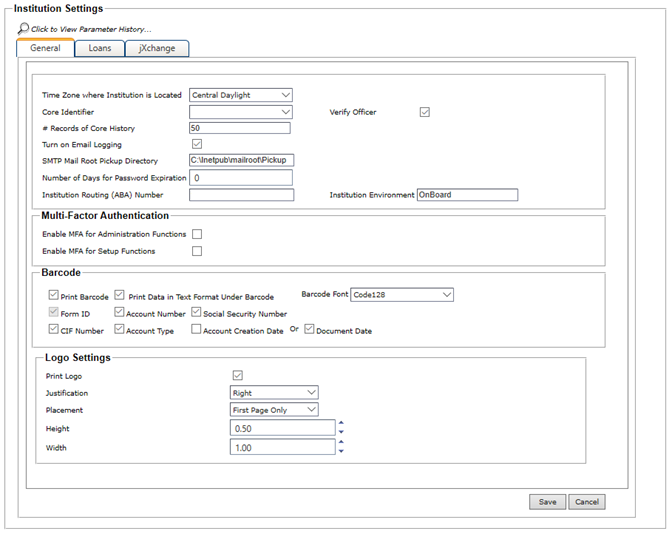
- Time Zone Institution is Located in
- A selection in this field is only required if your institution supports consumer closed-end real estate or commercial letter of credit transactions.
- Core Identifier
- Establishes the core system to which OnBoard integrates.
- Verify Officer
- When selected, the Officer Code in the core system is verified against the Officer Code selected in Loans In Process.
- # Records of Core History
- Establishes the number of records from core history to display within inquiry. This feature is used to limit the number of records jXchange returns to OnBoard during history inquiry. This feature optimizes performance by preventing the system from processing more information than is necessary.
- Turn On Email Logging
- When selected, an email is sent to a specific address when a work queue is changed on nodes within Loans in Process.
- SMTP Mail Root Pickup Directory
- This field is used by OnBoard support to redirect an email when there is an issue in sending the original email.
- Number of Days for Password Expiration
- This field determines how many days occur before user passwords expire. This setting applies to all users, except the administrator. If the administrator's password expires, the override settings must be changed manually in User Management. The system allows up to three digits in the Number of Days for Password Expiration field.
- Institutional Routing (ABA) Number
- The identification number of the financial institution. This is the transit or nine-digit number assigned to financial institutions for routing, assigned by the American Bankers Association®. Some jXchange instances use the financial institution's internally assigned bank number. Any leading zeros must be included for a complete routing and transit number. If a value is included on the request, the Service Gateway uses the included values as part of the authentication process. If a value is not included, Service Gateway attempts to use the default institution for the user credentials.
- Institutional Environment
- The description provided by financial institutions that defines the environment in which the institution is operating. If a value is included on the request, the Service Gateway uses it as part of the authentication process. If a value is not included, the Service Gateway attempts to use the default environment for the user credentials specified for the InstRtId.
- Print Barcode
- Select the Print Barcode field if your institution uses the barcode functionality. When the field is selected, more options are provided so you can determine which data is printed in the barcode. These settings are used for all documents when the Print Barcode check box is selected in System Setup, and when the documents are printed through Doc Manager during new account entry.
-

- Barcode Font
- This drop-down list allows institutions with third-party imaging
solutions to set a value of Code39.Note Institutions that use Synergy as their imaging solution must use the Code128 value.