Loans Tab Parameters
The following section includes information on options and sub-options available to users through the Loans tab under the Loans menu.
The Loans tab is divided into the following sections:
- Loan Terms
- Terms/Quick Quote Defaults
- Notice of Action
- WKFS Document Publishing
- Documents
- Miscellaneous
Loan Terms
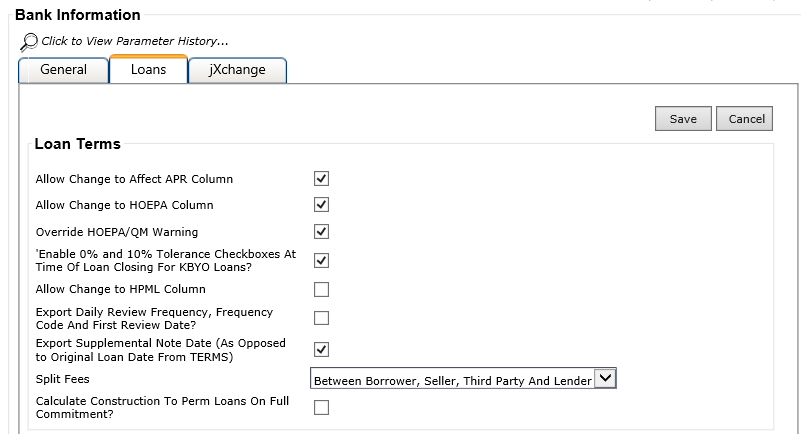
The Loan Terms section provides a range of settings affecting the Terms node within Loans in Process. The Split Fees menu determines what options appear in the Paid By section on the Fee Edit screen in .
The Calculate Construction to Perm Loans on Full Commitment? check box only applies to construction to perm loans since construction-only loans calculate on half commitment due to a Carleton limitation.
Terms/Quick Quote Defaults
The Terms/Quick Quote Defaults section allows you to enter a range of defaults for and .
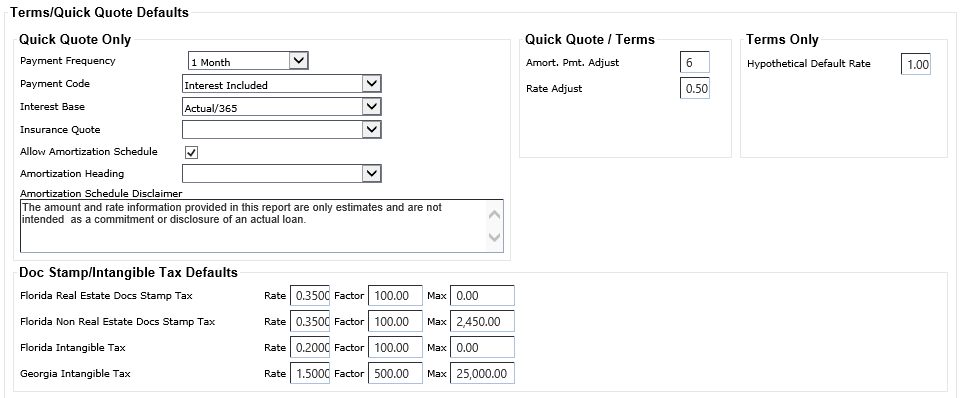
The Payment Frequency, Payment Code, Interest Base, and Insurance Quote values default to Quick Quote.
The Amortization Payment Adjust (Amort. Pmt. Adjust) and Rate Adjust fields default to Terms and Quick Quote.
Hypothetical Default Rate only defaults to Terms.
The Florida Real Estate Docs Stamp Tax, Florida Non Real Estate Docs Stamp Tax, Florida Intangible Tax, and Georgia Intangible Tax fields are used to calculate the correct fee information in Terms.
Notice of Action
When you select Show HMDA Tab, you can export HMDA information to the core system for Notice of Action transactions.

When Show HMDA Tab is selected, the Loan Number Same as HMDA Application Number field appears. This field determines if the Loan Number field appears in . When the Loan Number Same as HMDA Application Number field is selected, the Loan Number field does not appear in the Notice of Action node in Loans in Process.
WKFS Document Publishing
The WKFS Document Publishing section is strictly for OnBoard support.

Documents
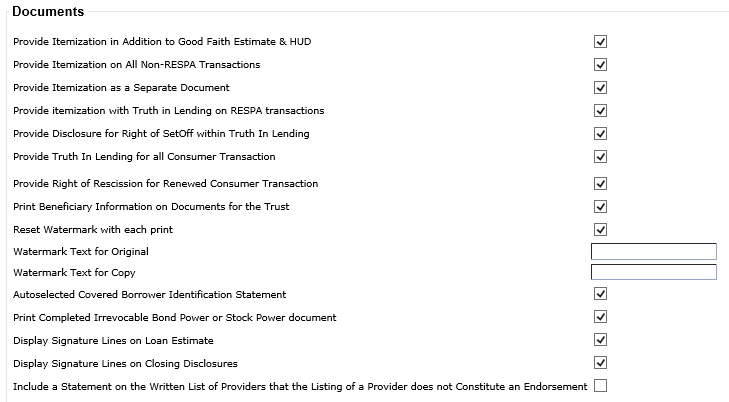
The Documents section allows you to select a range of documents not controlled by OPSA. Each option is a global field setting.
Miscellaneous
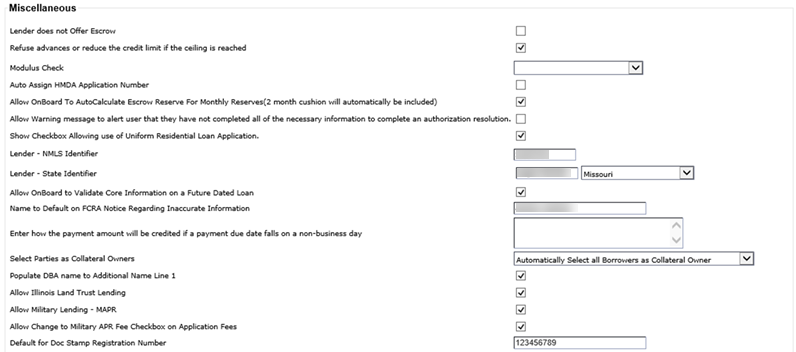
The Miscellaneous section includes the following fields:
- Lender Does Not Offer Escrow
- Refuse Advances or Reduce the Credit Limit if the Ceiling is Reached
-
Modulus Check
Note This field is only used when not automatically generating account numbers. Modulus Check options include:
- 1 - Mod 10
- 11 - Mod 11 Arithmetic
- 1I (i) - Mod 11 IBM® Standard
- 1G - Mod 11 Geometric
- ST - Straight All
- R4 - Mod 11 Remainder 4
- Auto Assign HMDA Application Number
- Allow OnBoard to AutoCalculate Escrow Reserve For Monthly Reserves (2 Month Cushion Will Automatically Be Included)
- Allow Warning Message to Alert User That They Have Not Completed All of the Necessary Information to Complete an Authorized Resolution.
- Show Checkbox Allowing Use Of Uniform Residential Loan Application.
- Lender - NMLS Identifier
- Lender - State Identifier
- Allow OnBoard To Validate Core Information On A Future Dated Loan?
- Name To Default On FCRA Notice Regarding Inaccurate Information
- Enter How the Payment Amount Will Be Credited if a Payment Due Date Falls on a Non-Business Day
- Select Parties as Collateral Owners
- Populate DBA Name to Additional Name Line 1
- Allow Illinois Land Trust Lending
-
Allow Military Lending - MAPR
Note This option determines if a financial institution offers military loans. Selecting this option causes additional options to become available that are specific to military loans.
-
Allow Change to Military APR Fee Checkbox on Application
Fees
Note This option is only available for selection when Allow Military Lending - MAPR is selected.
- Default for Doc Stamp Registration Number