Additional Information for TILA-RESPA Transactions
The tab includes fees that are applicable to the TILA-RESPA regulatory requirements and is used for any transaction created with an application date of 10/3/2015 or after.
Figure 1. The Tab
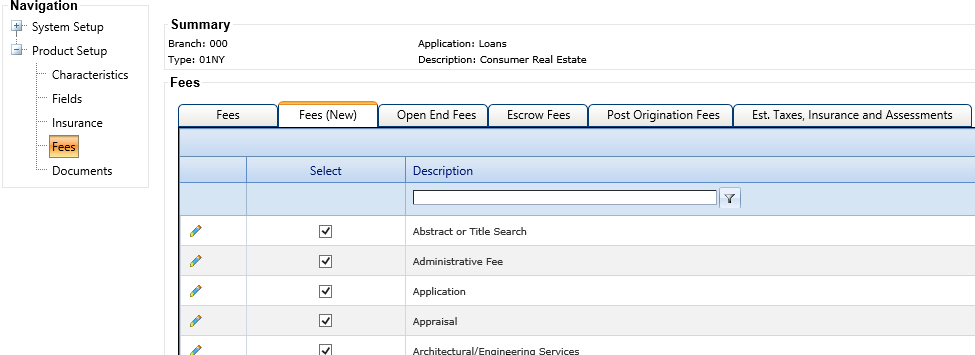
The Display Sequence column determines the order in which fees appear on the tab. The Display Sequence column only applies to transactions with an application date of 10/3/2015 or after.
Editing Fees
To edit the information for a fee, click  Edit on the Fees tab.
Figure 2. Editing Fees
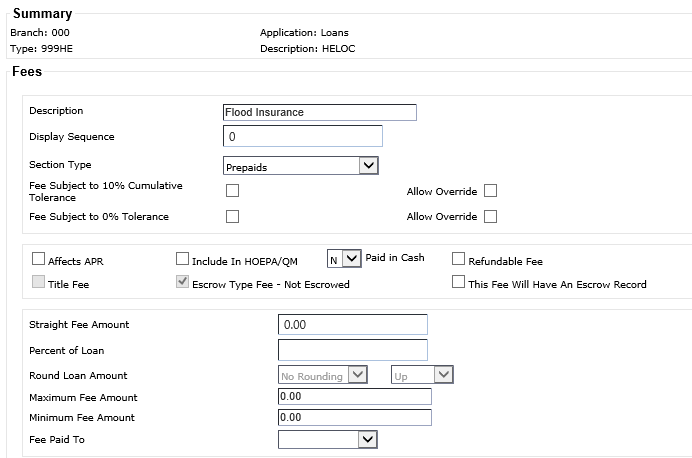
The following TILA-RESPA related fields appear on the Fees - TERMS tab:
- Section Type
- This field defines which section the fee prints in of the Integrated Disclosures. The selected value for the Section Type at the main level fee defaults to all product fees tied to it. You can modify the individual selection at the product level. The system retains any modified selections for the product type until the main fee is modified again.
- Fee Subject To 10% Cumulative Tolerance
- If the Fee Subject To 10% Cumulative Tolerance check box is selected, it defaults as selected for the fee in .
- Fee Subject To 0% Tolerance
- The Fee Subject
To 0% Tolerance check box is available for main fees. Selecting this check
box for main static fees pre-fills the check box for all product types. Institutions can
maintain the selection on individual product fees tied to the main fee. If the selection
is modified again at the main fee level, then it pre-fills all product fees tied to the
main fee again. For user-defined fees, this check box does not pre-fill from main fees.
The Allow Override
check box is available next to Fee Subject To 0% Tolerance. This check box determines if Fee Subject To 0% Tolerance
can be modified on the tab.Note Only the Fee Subject To 10% Cumulative Tolerance or the Fee Subject To 0% Tolerance field can be selected. Both check boxes cannot be selected at the same time.
- Allow Override
- The Allow Override check box is automatically selected when a fee is first edited. Any modifications are retained for future edits. When the Allow Override check box is selected for the Fee Subject To 10% Cumulative Tolerance field, users can modify the Fee Subject to 10% Tolerance field on the tab. If Allow Override is not selected, the Fee Subject to 10% Tolerance field is unavailable and does not allow modifications. The same logic applies to the Fee Subject To 0% Tolerance field.
- Title Fee
- This field indicates if the fee is a title fee. When selected, Title prints before the fee description.
- Optional Fee
- This field is only available when the Section Type field value is Other Charges. This field indicates if fee is an optional fee. When selected, option prints after the fee description. This fee typically discloses premiums paid for separate insurance (just as credit life debt suspension owner's title policy), warranty guarantee, or event coverage product imposed by the creditor or loan originator.
- Escrow Type Fee - Not Escrowed
- This field defines the fees that print Escrow No in the Estimated Taxes, Insurance & Assessments section of the Integrated Disclosures.
- This Fee Will Have An Escrow Record
- The This Fee Will Have An Escrow Record field appears if the Escrow Type Fee - Not Escrowed check box is selected for the fee.