Applicant
The following section explains the functions and features available to users on the Applicant node.
The Applicant node allows you to add a record for an individual or entity.
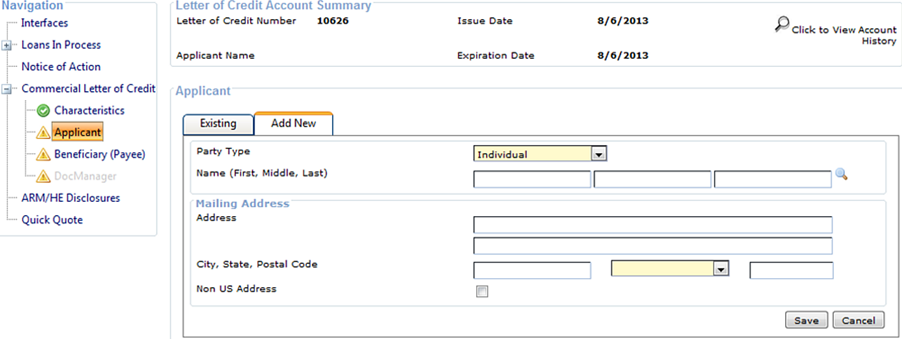
When the Party Type is set to Entity, a Signers tab is available, and you are required to add at least one signer on this tab. You can also add nested entity signers, when needed. If multiple signers are added along with nested entity signers, the Signer Required to Sign the Documents option must be selected for at least one signer on each level. You cannot complete the Applicant node without meeting this requirement.
Selecting the  Spyglass on the Name fields allows you to select
an existing customer. For existing customers with a foreign address in core, a CIF
Foreign Address Conversion screen appears to convert the address to city, state,
and postal code for documentation purposes.
Spyglass on the Name fields allows you to select
an existing customer. For existing customers with a foreign address in core, a CIF
Foreign Address Conversion screen appears to convert the address to city, state,
and postal code for documentation purposes.
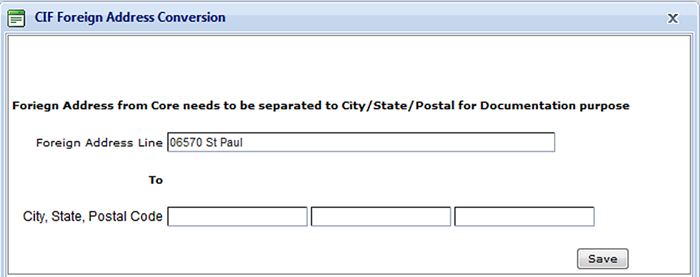
The value in the Foreign Address Line populates the second Address line on the Add New tab, which is only used for export. The entries in the City, State, and Postal Code fields populate the City, State, and Postal Code fields on the Add New tab, which print on documents.
When an existing customer has a foreign address, select the Non US Address field on the Edit tab. If entering a new customer with a foreign address, select the Non US Address field on the Add New tab. Selecting the Non US Address field displays the Country field. Also, when the Non US Address field is selected, messages appear to indicate which fields are used for export and documentation purposes. The message, **For Export, appears next to the second Address line. The message, **For Documents, appears next to the City, State, and Postal Code fields.