Doc Manager
The following section describes functions and features available to users on the Doc Manager screen.
TheDoc Manager node is only available after the Applicant and Beneficiary (Payee) nodes are complete.
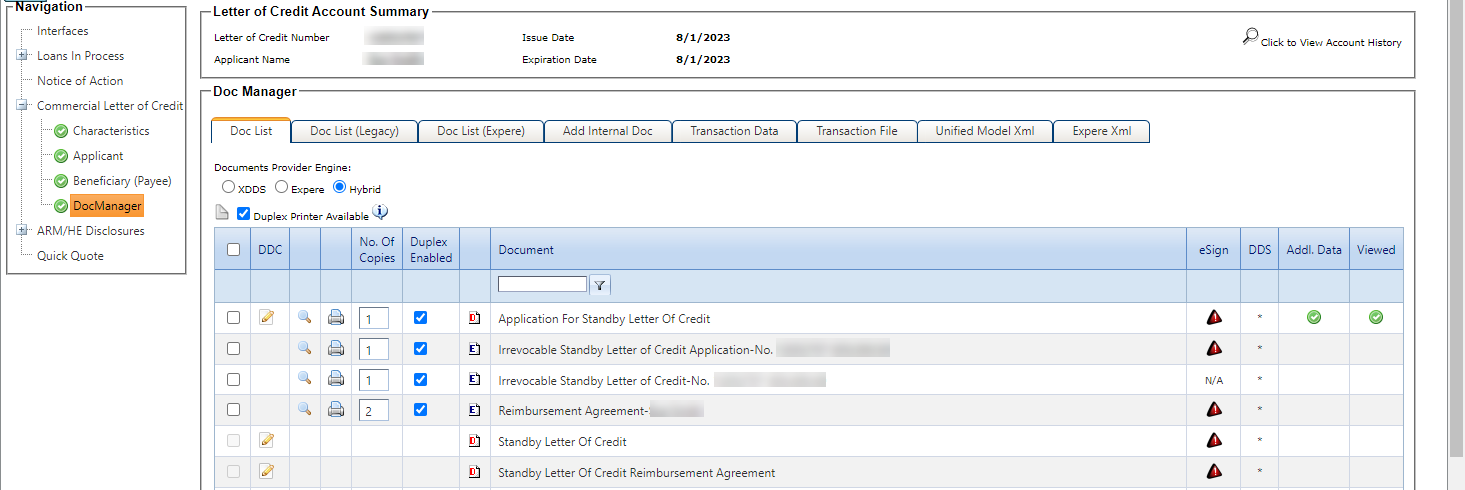
Documents for the transaction are automatically generated when you select the Doc Manager node. The Doc List tab displays the following documents:
- Application For Standby Letter Of Credit
- Standby Letter Of Credit
- Standby Letter Of Credit Reimbursement Agreement
Additional internal documents appear on the Doc List tab when the Always Display check box in is selected, or if the documents are tied to the selected product type. You can also add internal documents on the Internal Docs tab. Internal documents that are generated based on settings in system setup or product setup can be deleted when they are not needed for a transaction.
In the Doc Manager node, you have access to the Duplex Enable and Number of Copies options, as well as the Print and Zip functionality.
 Pending status. Select
the Doc Manager node
again to generate the updated documents automatically.
Pending status. Select
the Doc Manager node
again to generate the updated documents automatically.