Running a Credit Report
Complete the following steps to running a credit report within the Interfaces node using Equifax®.
-
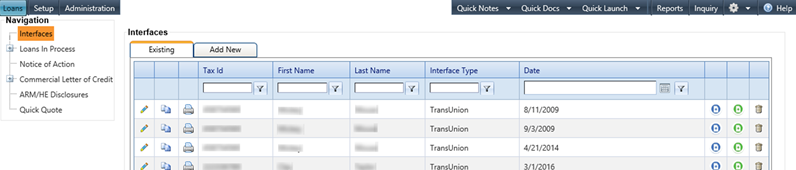
Select the Interfaces node from
the Loans
menu.
The Interfaces main screen appears.
-
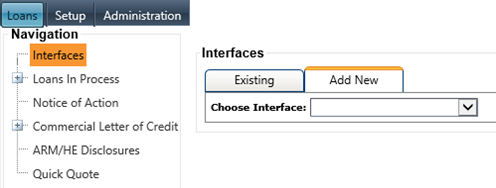
Select the Add
New tab.
The Interfaces screen appears.
-
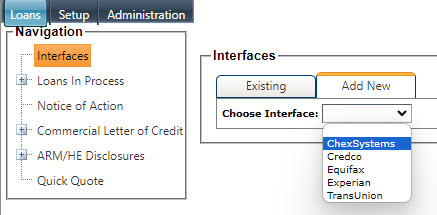
Select the correct credit report
company from the Choose
Interface drop-down menu.
The Signer One (default) tab screen for the selected credit report company appears.
 Note For the following example, Equifax was selected as the interface. The fields and tabs can vary depending on the interface selected.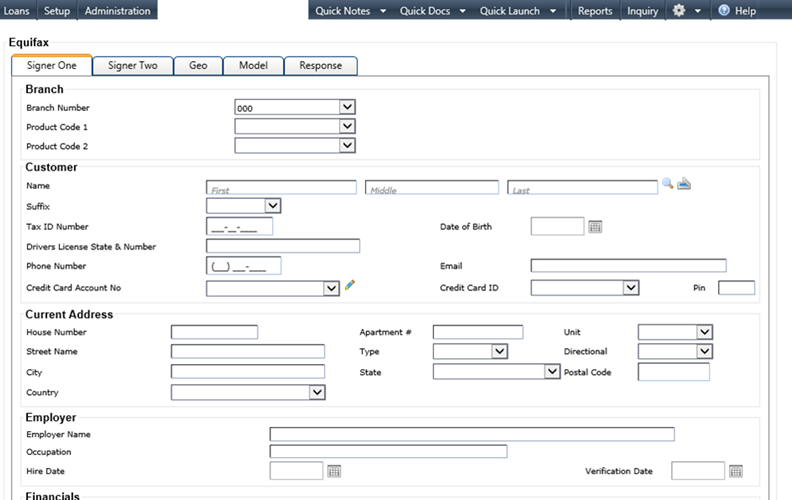
-
Follow the steps in the following table
to complete the appropriate information for transmission to the credit bureau.
Situation Steps Performing a Bank Customer Inquiry - Select the
 Spyglass
icon to display the Customer Selection
screen.
Spyglass
icon to display the Customer Selection
screen. - Enter search criteria and select Search.
- When the customer search is complete, select the Spyglass
icon to populate the fields with the current customer information.
Performing a Non-Bank Customer Inquiry - Manually enter the customer's information in the required fields.
Running a Report on Second Borrower - Complete the required fields for the first signer.
- Enter the information for the second borrower on the Signer Two tab.
Duplicating Information from Signer One to Signer Two - Complete the required information on the Signer One tab.
- Select the Duplicate button.
- Select the