Additional Information for TILA-RESPA Transactions
The tab includes fees that are applicable to the TILA-RESPA regulatory requirements and is used for any transaction created with an application date of 10/3/2015 or after.
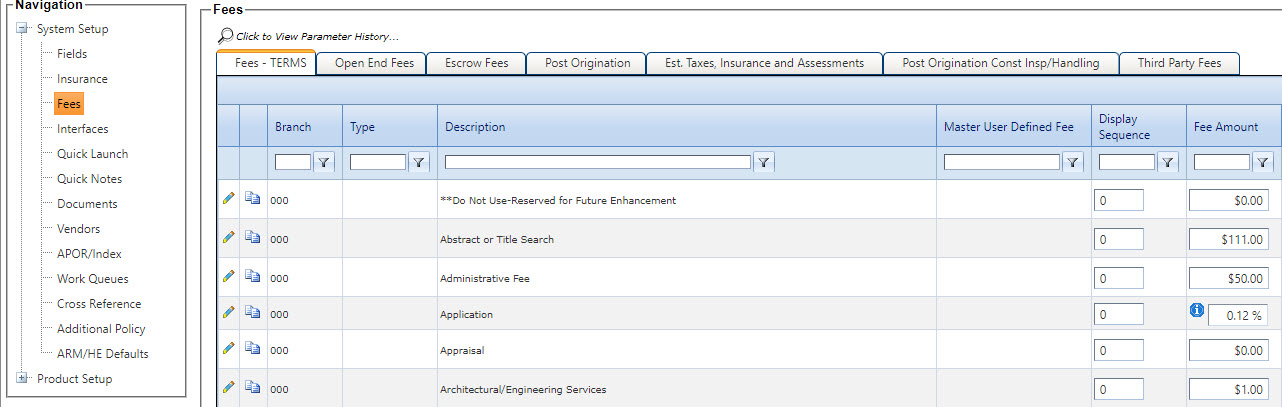
The Master User Defined Fee column only applies to user-defined fees. When a user-defined fee record is created for a branch or product, then this column fills with the description that was created with the record.
The Display Sequence column determines the order in which fees appear on the tab. The Display Sequence column only applies to transactions with an application date of 10/3/2015 or after.
The system uses the Type column and then the Display Sequence column to determine the order in which fees appear on the tab.
Editing Fees
To edit the information for a fee, click  Edit on the Fees - TERMS tab.
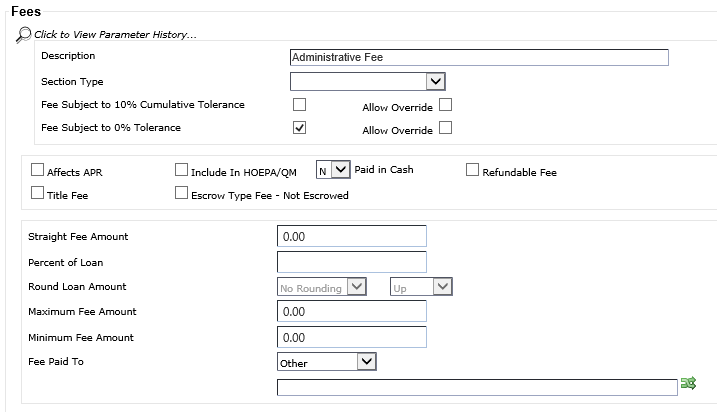
The following TILA-RESPA related fields appear on the Fees - TERMS tab:
- Section Type
- This field defines which section the fee prints in of the Integrated Disclosures. The selected value for the Section Type at the main level fee defaults to all product fees tied to it. You can modify the individual selection at the product level. The system retains any modified selections for the product type until the main fee is modified again.
- Recording Fee Type
-
This drop-down list allows financial institutions to define how certain recording fees are disclosed. This drop-down list is available under the following conditions:
- The Section Type is Taxes and Other Government Fees.
- The fee is a User Defined fee or a static fee with a Description of Filing.
The following options are available:
- Blank - If selected, then the value for that fee is disclosed under the Transfer Taxes total on the Loan Estimate and is itemized individually on the Closing Disclosure.
- Deed - If selected, the value for the fee is itemized as Deed within the Recording Fee line item on the Closing Disclosure.
- Mortgage - If selected, the value for the fee is itemized as Mortgage within the Recording Fee line item on the Closing Disclosure.
- Other - If selected, the value for the fee is included as part of the total recording fees and is not separately itemized.
A tooltip appears when you hover over the drop-down list: For any Transfer Taxes - this Drop Down should be left Blank.
For static fees, the Recording Fee Type drop-down list functions like the Section Type drop-down list. The selected value for the Recording Fee Type at the main level fee defaults to all product fees tied to it. You can modify the individual selection at the product level. The system retains any modified selections for the product type until the main fee is modified again. For user-defined fees, this drop-down list is individually maintained for each record and does not prefill from a main record selection.
- Fee Subject To 10% Cumulative Tolerance
- If the Fee Subject To 10% Cumulative Tolerance check box is selected, it defaults as selected for the fee in .
- Fee Subject To 0% Tolerance
- The Fee Subject
To 0% Tolerance check box is available for main fees. Selecting this check
box for main static fees pre-fills the check box for all product types. Institutions can
maintain the selection on individual product fees tied to the main fee. If the selection
is modified again at the main fee level, then it pre-fills all product fees tied to the
main fee again. For user-defined fees, this check box does not pre-fill from main fees.
The Allow Override
check box is available next to Fee Subject To 0% Tolerance. This check box determines if Fee Subject To 0% Tolerance
can be modified on the tab.Note Only the Fee Subject To 10% Cumulative Tolerance or the Fee Subject To 0% Tolerance field can be selected. Both check boxes cannot be selected at the same time.
- Allow Override
- Modifications to Allow Override on user-defined fees only apply to the fee in System Setup or Product Setup, depending on where the modification is performed. If you modify Allow Override on a static fee (not a user-defined fee), the modification is also applied to all products tied to the fee in . When you click Save, the fee record is updated in Product Setup.
- Title Fee
- This field indicates if the fee is a title fee. When selected, Title prints before the fee description.
- Optional Fee
- This field is only available when the Section Type field value is Other Charges. This field indicates if fee is an optional fee. When selected, option prints after the fee description. This fee typically discloses premiums paid for separate insurance (just as credit life debt suspension owner's title policy), warranty guarantee, or event coverage product imposed by the creditor or loan originator.
- Escrow Type Fee - Not Escrowed
- This field defines the fees that print Escrow No in the Estimated Taxes, Insurance & Assessments section of the Integrated Disclosures.
For fees copied to a product type, you cannot change the selections on static fees, but you can change the selections on user-defined fees. For static fees, the selection carries from the main field.
When a fee is tied to a product type in , the This Fee Will Have an Escrow Record check box appears on the edit screen for the fee in . Modifications to this check box in System Setup appear in .