Complete the following steps to add escrow to an existing
account.
-
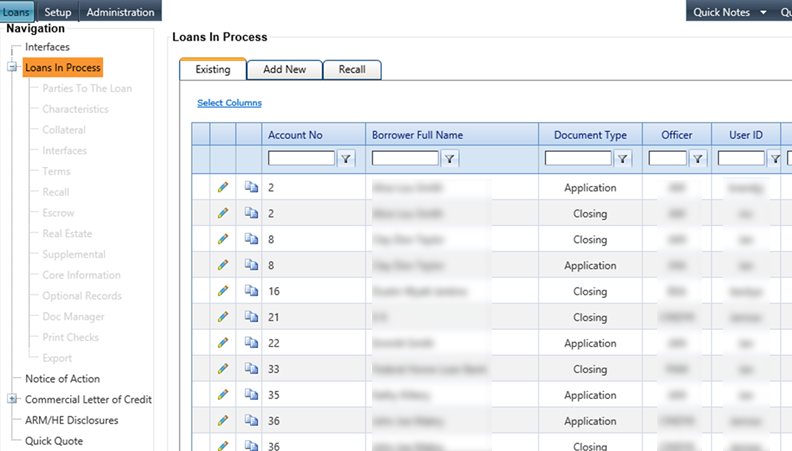
Select the Loans in Process node from
the Loans
menu.
The
Loans in Process screen
appears.
-
Create a loan transaction with
escrow.
-
Select the Escrow node.
The
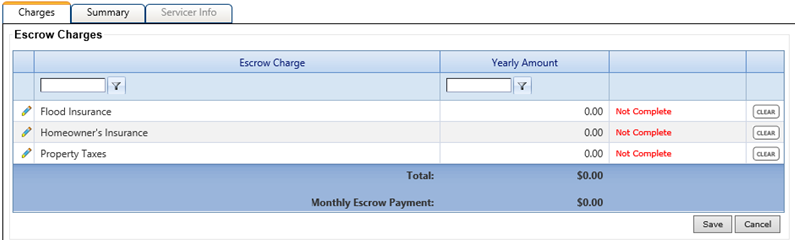
Escrow Charges screen appears.
Escrow fees selected for the applicable product type appear on this screen.
-
Select the
 Edit icon next to the
escrow charge.
Edit icon next to the
escrow charge.
-
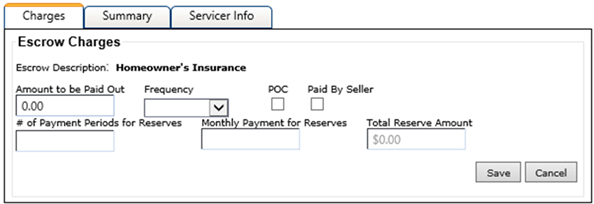
Enter an amount in the Amount to be Paid Out
field.
-
Select the Frequency from the
drop-down menu.
The menu options are: Annually, Twice a
Year, and Monthly. Different screens appear for each
selection.
-
Select the POC (Paid Outside Closing) and/or the Paid by Seller fields, if required.
Note Values that appear in
# of Payment Periods for
Reserves, Monthly Payment for Reserves, and Total Reserve Amount fields
are determined by the information entered in the Amount to be Paid Out field
and the Frequency
that is selected. This information automatically populates if the parameter on the
Loans tab in Institution Settings is
selected.
- POC
- The POC (Paid Outside Closing) option is not available when the Frequency is Monthly.
-
- If the escrow disbursement is annually, the POC option is selected,
and the Allow OnBoard to
AutoCalculate Escrow Reserve for Monthly Reserves (2 month cushion will
automatically be included) parameter is selected on the tab, the following information applies:
The #
of Payment Periods for Reserves field is always 2 for the POC
item, and no automatic calculation occurs.
The Number Months for Cushion is always 2.
- If the escrow disbursement is twice a year, the POC option is selected,
and the Allow OnBoard to
AutoCalculate Escrow Reserve for Monthly Reserves (2 month cushion will
automatically be included) parameter is selected on the tab, the following information applies:
- The # of
Payment Periods for Reserves field is available for input and is
not calculated by the system.
- The Number Months for Cushion is available for input and does not
default.
Note In this
scenario, an icon appears next to the POC option with the
following warning message: When escrow disbursement is POC
and made twice a year, both reserves and cushion will need to be determined by
user.
-
Select Save.
-
Repeat steps 4 through 8 for each
escrow charge.
-
Return to the main Escrow Charges
screen.
-
When required, select one or all of the following, which appear on the main
Escrow Charges screen.
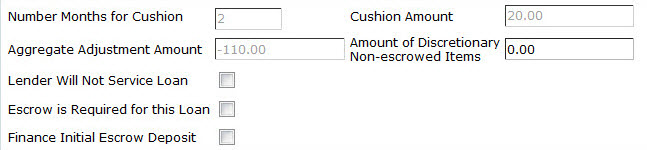
- Lender Will Not Service the Loan
- When you select this check box, the Servicer Info tab becomes
active displaying the Entity
Type, Name, Address, City, State, Postal
Code, and Telephone Number fields.
- Escrow Is Required for This Loan
- When you select this check box, information is added to customer
documents and an additional check box, Provide Separate Agreement for Escrow
Terms, appears.
- Finance Initial Escrow Deposit
- When you select this check box and click Save, a disbursement
record, which increases the loan amount, is created for the amount of the initial escrow
deposit in the Terms node. Terms is then automatically recalculated.
-
Select Save once all
information for the escrow charge is entered.