HOEPA Check
This information pertains to the HOEPA check that is available in OnBoard.
To run a HOEPA check in OnBoard, select the Run HOEPA Check On Save And Calculate For This Loan? option on the HOEPA/QM tab in the Terms node.
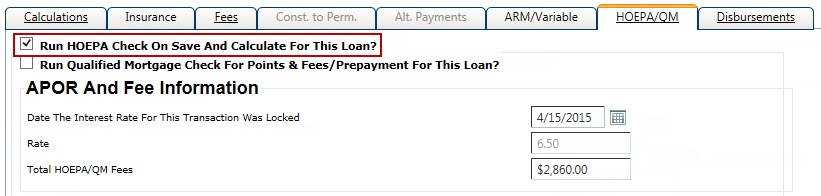
HOEPA/QM Tab
The HOEPA/QM tab only appears in the Terms node when all of the following conditions are true:
- The loan is secured by the customer's principal dwelling.
- The application date is equal to or after January 10, 2014.
- The loan is construction only, and will be used for improvements and not for initial construction.
The HOEPA check is available for HELOC, Equicheck, and Evergreen loans when any of the following conditions are true:
- The Home Equity option is selected in Characteristics, and if the loan is a construction only loan, it must be for improvements and not initial construction.
- The Type of Repayment is Evergreen in Characteristics, and if the loan is a construction only loan, it must be for improvements and not initial construction.
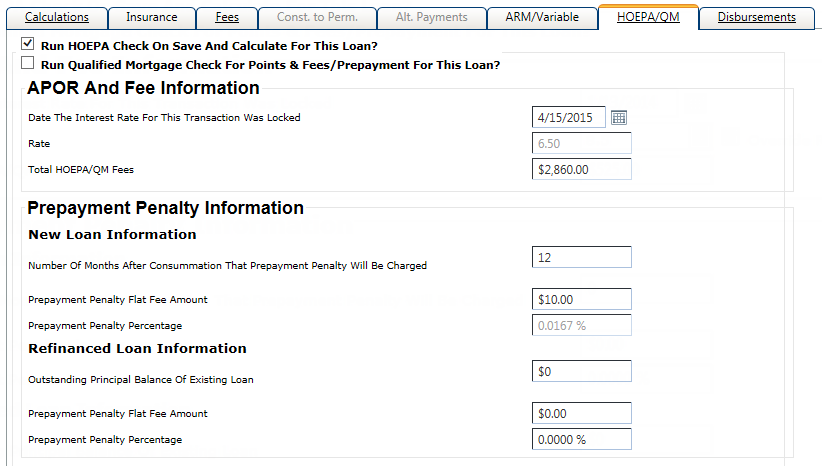
The HOEPA/QM tab contains the following information:
- Run HOEPA Check On Save and Calculate For This Loan?
- This field triggers the HOEPA check.
The APOR and Fee Information section contains the following fields:
- Date The Interest Rate For This Transaction Was Locked
- Defaults to the Application Date from Characteristics.
- Rate
- Defaults to either 6.50% or 8.50%.
- Total HOEPA/QM Fees
- Total of all fees with the HOEPA/QM column selected on the Fees tab, and also includes any prepayment penalty fee.
- Open End Post Origination Fee(s)
- This field is only available for open-end loans. Any value in this field is included in the Total HOEPA/QM Fees.
The Prepayment Penalty Information section contains the New Loan Information and Refinanced Loan Information sections.
The New Loan Information section contains the following fields:
- Number Of Months After Consummation That Prepayment Penalty Will Be Charged
- This field is required if a value is entered in the Prepayment Penalty Flat Fee Amount or Prepayment Penalty Percentage field.
- Prepayment Penalty Flat Fee Amount
- If a value is entered in this field, the system calculates a value for the Prepayment Penalty Percentage. The Prepayment Penalty Flat Fee Amount is used for the Total HOEPA/QM field in the APOR and Fee Information section.
- Prepayment Penalty Percentage
- If a value is entered in this field, the system calculates a value for the Prepayment Penalty Flat Fee Amount.
The Refinanced Loan Information section contains the following fields:
- Outstanding Principal Balance Of Existing Loan
- This field is required if a value is entered in the Prepayment Penalty Percentage field.
- Prepayment Penalty Flat Fee Amount
- If a value is entered in this field, the system calculates a value for the Prepayment Penalty Percentage. The Prepayment Penalty Flat Fee Amount is used for the Total HOEPA/QM field in the APOR and Fee Information section.
- Prepayment Penalty Percentage
- If a value is entered in this field, the system calculates a value for the Prepayment Penalty Flat Fee Amount.
HOEPA APR
For closed-end loans, the HOEPA APR is calculated as follows:
- Fixed-Rate Loans - The HOEPA APR is equal to the interest rate in effect on the date you set the rate for the transaction. This rate is defaulted from the Calculation tab in Terms.
-
Variable and ARM Loans - The HOEPA
APR is the greater rate of:
- Indexed Rate - The master rate plus the margin.
- Introductory Rate
Once the HOEPA APR is calculated, the system looks at either the fixed or variable APOR (Average Prime Offer Rates) table.
- Fixed APOR Table - The system looks at the date in the table that is prior to the Date The Interest Rate For This Transaction Was Locked field, and then locates the corresponding term of the loan. For Evergreen loans that have no term, the system uses a 30-year term. The system then determines if the HOEPA APR exceeds the APOR rate using the APR Coverage Test.
- Adjustable APOR Table - The system looks at the date in the table that is prior to the Date The Interest Rate For This Transaction Was Locked field, and then locates the corresponding first review term of the loan. The system then determines if the HOEPA APR exceeds the APOR rate using the APR Coverage Test.
Points & Fees Tiers
Click here to view the current Truth in Lending (Regulation Z) Annual Threshold Adjustments from the Consumer Financial Protection Bureau.
Transaction is a High-Cost Mortgage
A transaction is a high-cost mortgage if:
- The APR exceeds the Average Prime Offer Rate (APOR) for a comparable
transaction on that date by more than:
- 6.5 percentage points for first-lien transactions, generally.
- 8.5 percentage points for first-lien transactions that are for less than $50,000 and secured by personal property (RVs, houseboats, and manufactured homes titled as personal property, etc.).
- 8.5 percentage points for junior-lien transactions.
- The Points & Fees exceed tiers listed in the previous Points & Fees Tiers table.
- A prepayment penalty is imposed more than 36 months after consummation. (This pertains to new loans only.)
- The prepayment penalty is more than 2% of the amount prepaid. (This pertains to new loans only.)