Modification
The following section contains information on the functions and features available to users when the Loan Stage has a value of Modification.
When the Loan Stage is set to Modification, the following screen appears when you select the Recall node.
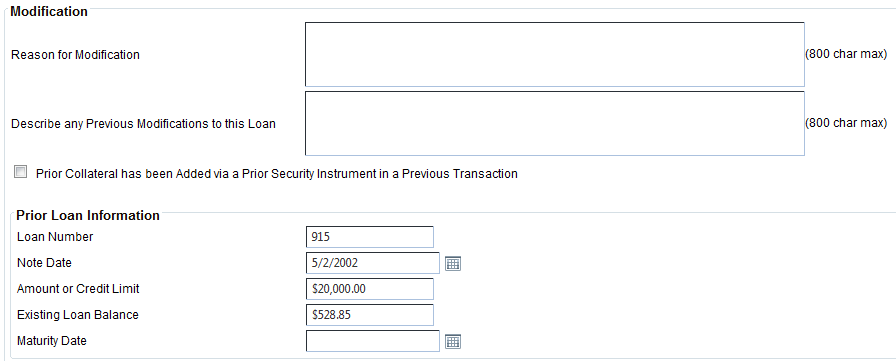
Consumer Closed-End Modifications
For consumer closed-end modifications, users can perform the following tasks:
- Change the Interest Rate
- Change the Post-Maturity/Default Interest Rate
- Change the Maturity Date
- Increase the Loan Amount
- Add new or existing collateral
- Release collateral
The Payments section only prints when users indicate an increase in the loan amount, a change in the interest rate, or a change in the maturity date.
Consumer Open-End Modifications
For consumer open-end modifications, users can perform the following tasks:
- Change the Interest Rate
- Change the Maturity Date
- Increase or decrease the Credit Limit
- Add new or existing collateral
- Release collateral
- Change the open-end draw terms or repayment terms
- Change the Payment Amount
- Change the Payment Frequency
- Change the Advance Method
The Payments section only prints when users change the Payment Amount or the Payment Frequency. The related text prints based on the change that was made.
Commercial/Agricultural Close-End Modifications
For commercial/agricultural close-end modifications, users can perform the following tasks:
- Change the Interest Rate
- Change the Maturity Date
- Change the Post Maturity Default Interest rate
- Increase the Loan Amount
- Add new and existing collateral
- Release collateral
The Payments section only prints when users change the Loan Amount, Interest Rate, or Maturity Date.
Commercial/Agricultural Revolving Modifications
For commercial/agricultural revolving modifications, users can perform the following tasks:
- Change the Interest Rate
- Change the Maturity Date
- Change the Post Maturity Default Interest rate
- Increase or decrease the Credit Limit
- Add new and existing collateral
- Release collateral
The Payments section only prints when users change the Credit Limit, Interest Rate, or Maturity Date.