Qualified Mortgage Check
To run a Points & Fees and Prepayment Penalty check for a Qualified Mortgage (QM), select the Run Qualified Mortgage Check For Points & Fees/Prepayment For This Loan? option on the HOEPA/QM tab in the Terms node.
This option is only enabled when the Loan Term is less than or equal to 30 Years, and when the Payment Code is not Interest Only.
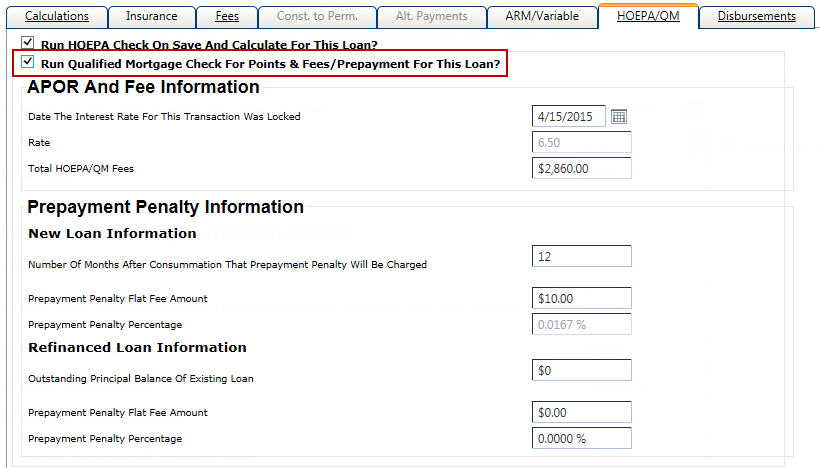
When performing only a QM check, and not a HOEPA check, the following fields are unavailable on the HOEPA/QM tab:
- Date The Interest Rate For This Transaction Was Locked
- Rate
- Post Origination Fee(s)
- Number of Months After Consummation That Prepayment Penalty Will Be Charged
The fields applicable for a QM check are:
- Total HOEPA/QM Fees
- Total of all fees with the HOEPA/QM column selected on the Fees tab, and also includes any prepayment penalty fee.
- Prepayment Penalty Flat Fee Amount
- If a value is entered in this field, the system calculates a value for the Prepayment Penalty Percentage. The Prepayment Penalty Flat Fee Amount is used for the Total HOEPA/QM field in the APOR and Fee Information section.
- Prepayment Penalty Percentage
- If a value is entered in this field, the system calculates a value for the Prepayment Penalty Flat Fee Amount.
Any fee that has the HOEPA/QM column selected on the Fees tab is included in the Points & Fees test for QM, as well as the flat fee amount of the prepayment penalty, if applicable. If you enter a percentage in the prepayment penalty information, the system calculates the flat fee amount.
Limitations for Points & Fees Test for QM
Visit the Consumer Financial Protection Bureau website for more information about Truth in Lending (Regulation Z) annual threshold adjustments.