General Tab
The following section provides information on the functions and features available to users on the General tab.
The General tab appears for real estate transactions with an application date of 10/3/2015 or after.
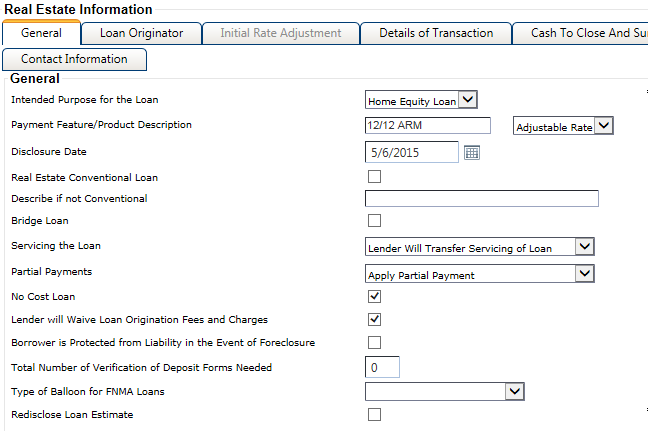
For consumer closed-end transactions subject to the TILA-RESPA Integrated Disclosures rule, the following fields appear:
- Borrower is Protected from Liability in the Event of Foreclosure
- Select this field if the state law which applies to the real property transaction has an anti-deficiency statute that potentially protects the borrower from liability for an unpaid balance in the event of a foreclosure on the property.
- Bridge Loan
- Selecting this field triggers the Appraisal
Disclosure on the Loan Estimate and Closing Disclosure if the loan is subject to one of the
following:
- ECOA section 701(e) for closed-end loans secured by residential real estate property (first lien on a dwelling).
- TILA section 129H for higher risk mortgages - A Higher Price Mortgage Loan (HPML) is a closed-end consumer loan secured by a principal dwelling with rates that exceed a particular threshold, unless the loan finances an initial construction and is construction only, or has a Maturity Date of 12 months or fewer if the loan purpose is a bridge loan.
- Define Type of Borrower and Seller Closing Disclosure Needed
- This drop-down list only appears for certain transactions. The following
options are available for selection:
- Blank (default value)
- Borrower Only & Seller Only
- Borrower Only (without Seller Only)
- Seller Only (without Borrower Only)
Note If a value is not selected for the Define Type of Borrower and Seller Closing Disclosure Needed drop-down list, the system generates the Borrower and Seller Combined form. - Describe if not Conventional
- The following tooltip appears if this field is not available: FOR KBYO transactions, this field should only contain entry if the loan is insured or guaranteed by another Federal or a State agency. (§ 1026.37(a)(11)).
- Disclose Loan Estimate
- This check box is only available when the Document Type is Application. Only select
this check box if the Loan Estimate is disclosed. When
selected, the Date Changes
Occurred and Description of Changes fields appear. The additional fields that appear
when you select this check box print on the Changed
Circumstance form in Doc Manager.Note This check box is automatically selected if the COC check box is selected for any fee in the Terms node.
- Disclosure Date
- This field is available for transactions with certain collateral information. The field contains a default value, but it can be modified as needed. If the field is available, a value is required to complete the Real Estate node.
- Include Seller's Signature on the Closing Disclosure
-
This check box appears under the following conditions:
- The loan is a KBYO transaction.
- The Document Type is Closing.
- The Collateral Purchased with the Proceeds of the Loan check box is selected on the tab.
Note Selecting this check box only allows for an individual seller’s signature line on the Closing Disclosure - Seller Only Addendum, and it does not print the entity seller's signature on the Closing Disclosure.The Display Signature Lines on Closing Disclosures check box on the tab must also be selected for the seller's signature line to print on the Closing Disclosure - Seller Only Addendum.
- Include Signatures of Owners that are Not Borrowers
- This check box only appears for consumer closed-end transactions. When selected, it allows the signatures of the owners that are different than the borrowers to print on the Closing Disclosure Addendum, along with the borrowers. The following tooltip appears for the check box: Closing Disclosure Addendum.
- Intended Purpose for the Loan
- This field is available when certain conditions are met in the Characteristics node. The
field defaults to one of the following options based on the transaction data:
- Construction
- Home Equity Loan
- Purchase
- Refinance
The Intended Purpose of the Loan drop-down list is blank and required when the following conditions are met:
- The Collateral Purchased with Loan Proceeds field on the tab is not selected for the primary collateral.
- The Construction Type field value is Construction to Perm or Construction Only.
- The Construction Stage field value is Improvement.
If you modify the default value but do not click Save on the General tab, the drop-down list reverts to the default value.
CAUTIONCarefully review any modification to the default value. For example, if you change the value from Refinance to Construction on a transaction with a Loan Stage of Refinance, the transaction documents will not print the Construction loan purpose since there are additional conditions involved. - Partial Payments
-
This required field includes the following options:
- Apply Partial Payment
- Hold Until Complete Amount
- Does Not Accept
When a value is selected, it triggers content in the Partial Payments section of the Loan Disclosures. A default value can be established in .
- Payment Feature/Product Description
-
This field allows up to 35 characters and is required. The drop-down list defaults based on Terms data, but you can change the default if needed based on the CFPB regulation. However, when information is changed in Terms, the system does not automatically update the drop-down list. Users must manually update the list selection after changing the Terms values, if applicable.
For fixed rate transactions, when the tab is not complete and the Payment Feature/Product Description drop-down list is set to Fixed on the tab, the Payment Feature/Product Description text field only requires input when one of the following is true:
- The Payment Code is Interest Only on the tab.
- The transaction includes balloon terms on the tab.
- The tab is complete.
- The tab is complete.
CAUTIONIf the Terms node is modified after completing the Real Estate node, you should return to the tab and verify the selection in the Payment Feature/Product Description drop-down list. This action would be required if the modification in Terms changes the transaction from a fixed rate to ARM or step rate, or from an adjustable rate to a fixed rate. - Revision Identifier
- This field appears when Redisclose Loan Estimate is
selected. Users can enter up to two characters in the Revision Identifier
field.Note This information prints on the Loan Estimate, after the account number ([Account Number] - [Revision Identifier]).
- Servicing the Loan
-
This field is required and appears when the Document Type is Application. When a value is selected, it triggers the Servicing information within the Other Consideration section of the Loan Estimate form. The available options are:
- Lender Will Service
- Lender Will Not Service
A default value can be established in .