Required Service Provider Tab
There are two tables on the Required Service Provider tab: Fees Can Shop For and Fees Cannot Shop For.
These fees prefill with fee records that have a Section Type list value of Borrower can shop for or Borrower cannot shop for on the tab.
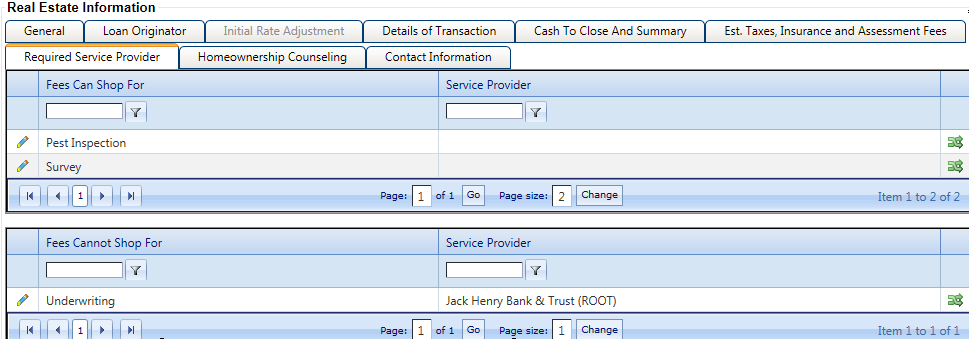
To adjust a fee in one of the tables, you must modify the fee on the tab. The changes are then reflected on the Required Service
Provider tab. However, users can edit service provider and contact information on
the Required Service Provider tab by selecting  Edit. The service provider name cannot be edited from the main
grid.
Edit. The service provider name cannot be edited from the main
grid.
A vendor prompt is available on the table to default to existing vendor records.
Users can select the  icon to open the Vendor Selection
window.
icon to open the Vendor Selection
window.
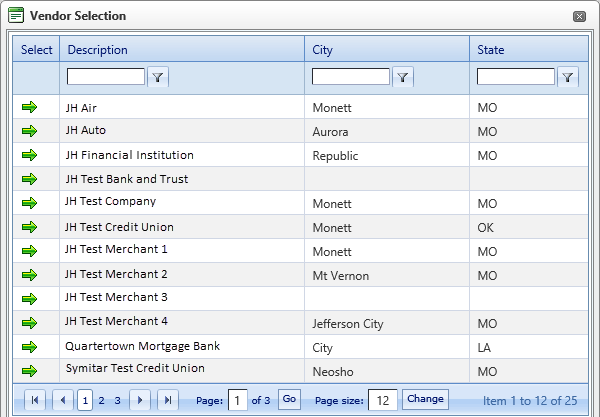
After you click the  Select icon, the name
populates the main grid. The additional fields on the edit screen of the Required Service Provider tables default based on the values in the
vendor file. The Contact Information section on the edit
screen populates based on the name table in the vendor file. Since there can be multiple names
set up per vendor, a check box is available to select the name that is used for the Required Service Provider default. Only one name can have this check
box per vendor record.
Select icon, the name
populates the main grid. The additional fields on the edit screen of the Required Service Provider tables default based on the values in the
vendor file. The Contact Information section on the edit
screen populates based on the name table in the vendor file. Since there can be multiple names
set up per vendor, a check box is available to select the name that is used for the Required Service Provider default. Only one name can have this check
box per vendor record.
The Written List of Providers form only prints Services Borrower Cannot Shop for if any one of the fees within this grid is defined with service provider information.