TILA-RESPA Fee Information
The following sections provide additional information on the tab for TILA-RESPA Integrated Disclosure transactions.
Fees Tab
Additional columns appear on the Fees tab for consumer closed-end real estate transactions with an application date of 10/3/2015 or after.
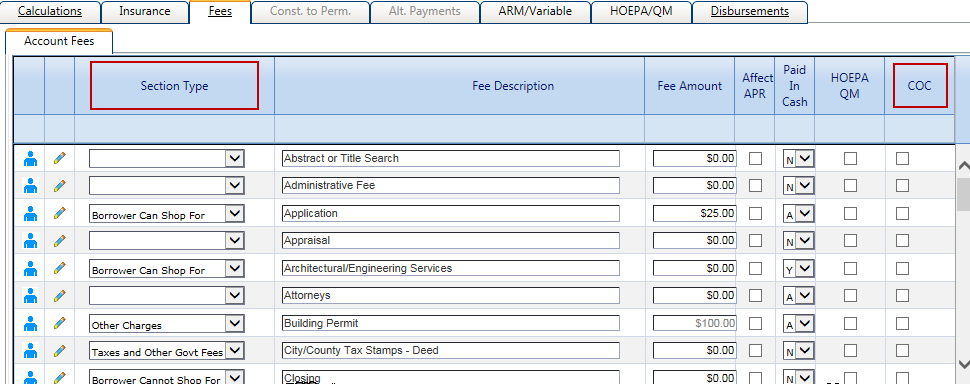
- Section Type
- The default value for this column is established in . The following options are available:
- Borrower Can Shop For
- Borrower Cannot Shop For
- Origination Charges - In System Setup, all origination charges have a Section Type default of Origination Charges. Do not modify this value.
- Other Charges
- Prepaids - This value defaults from the Product Type, and it is not available at the account level for selection or modification when defaulted.
- Taxes and Other Govt Fees
- COC
- The COC column only appears when the transaction Document Type is Application, and the check
box is only selected if the Loan Estimate is redisclosed when fees are changed. The column does not
appear until you first click Save in the Terms node.
If you select the COC check box for a fee on the Fees tab, an
 Information icon
appears with the following hover message: The original fee amount will be
disclosed as $xx.xx. This amount is located on the Fee Edit tab if changes are
needed. Details of the changes can be entered in the Real Estate Node/General
Tab.
Information icon
appears with the following hover message: The original fee amount will be
disclosed as $xx.xx. This amount is located on the Fee Edit tab if changes are
needed. Details of the changes can be entered in the Real Estate Node/General
Tab.
Editing Fees
To edit the information for a fee, click  Edit on the Fees tab.
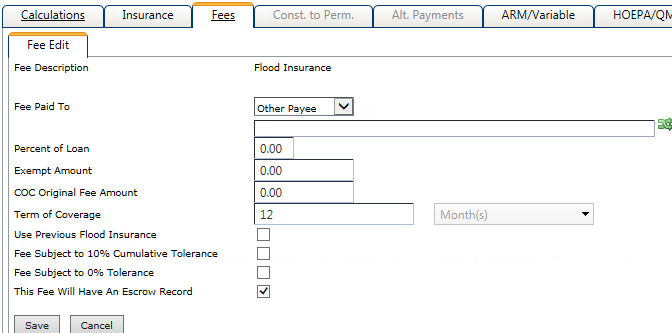
For consumer closed-end real estate transactions with an application date of 10/3/2015 or after, the following fields may appear based on the transaction details and the fee being edited:
- COC Original Fee Amount
- This field appears on the Fee Edit screen when the COC check box is selected for the fee on the tab. This field displays the previous fee amount whenever a fee is changed.
- Fee Subject to 0% Tolerance
- This check box defaults from . This check box only appears during the application phase for consumer
closed-end real estate transactions with an application date of 10/3/2015 or after.
Users can modify the selection if Allow Override is selected
for the fee at the product level. If the check box is selected during the application
phase, the selection carries over to closing and cannot be modified at closing. Note Fees can only be defined as either 10% or 0%. Fees cannot be defined as both.
- Fee Subject to 10% Cumulative Tolerance
- This check box defaults from . When the check box is not selected in Product Setup, it is only
available on the Fee Edit screen during the application
phase for consumer closed-end real estate transactions with an application date of
10/3/2015 or after. It is then carried to closing and cannot be modified at closing. The
check box appears when one of the following statements is true:
- The account is a consumer closed-end real estate transaction.
- The account includes Mobile Home Personal
Property/Residence collateral used with one of the following
collateral types:
- Raw Land
- 1–4 Family Dwelling
- Agricultural Land
Note Fees can only be defined as either 10% or 0%. Fees cannot be defined as both. - Frequency
- This drop-down list appears with the Term of Coverage field for fees with the Escrow Type Fees - Not Escrowed check box selected in . The Frequency list defaults to Month(s) and cannot be modified.
- This Fee Will Have An Escrow Record
- This field appears on the Fee Edit screen if the Escrow Type Fee - Not Escrowed check box is selected for the fee in . The field defaults based on the selection in Product Setup and cannot be modified.
Charges Subject to Tolerance Limits
For closing transactions, a Charges Subject to Tolerance Limits section appears on the Fees tab with calculations for the 0% and 10% tolerance fee amounts. These read-only fields are populated based on information entered on the Fees tab.
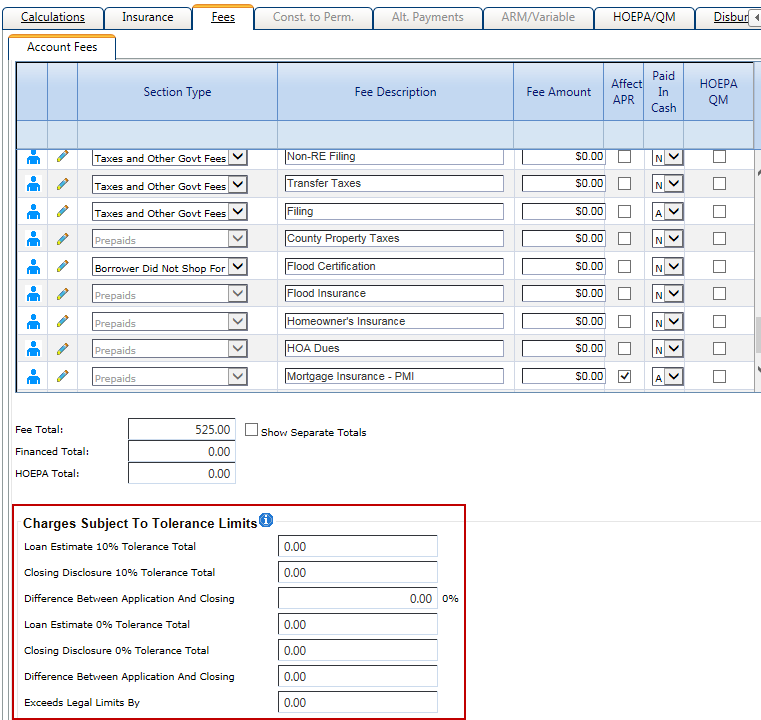
- Loan Estimate 10% Tolerance Total
- This field contains the total of all 10% tolerance fee amounts from the application phase of the transaction.
- Closing Disclosure 10% Tolerance Total
- This field contains the total of all 10% tolerance fee amounts from the closing phase of the transaction.
- Difference Between Application and Closing
- This field contains the difference between the Loan Estimate 10% Tolerance Total and Closing Disclosure 10% Tolerance Total. The percent change appears next to the field.
- Loan Estimate 0% Tolerance Total
- This field contains the total of all 0% tolerance fee amounts from the application phase of the transaction.
- Closing Disclosure 0% Tolerance Total
- This field contains the total of all 0% tolerance fee amounts from the closing phase of the transaction.
- Difference Between Application and Closing
- This field contains the difference between the Loan Estimate 0% Tolerance Total and Closing Disclosure 0% Tolerance Total. The percent change appears next to the field.
- Exceeds Legal Limits By
- This field contains a calculated value that is based on the difference between the application and closing values for the 10% and 0% fields.